5 minute read.Mission Accessible: building better user interfaces for everyone
Today is Global Accessibility Awareness Day, and accessibility has been on our minds lately. We’ve recently completed an internal audit of all our user interfaces, and have added a new accessibility page to our website, where you can find the accessibility documentation that we put together as part of the audit.
Why accessibility matters
Of course we want to keep the barriers to participation in Crossref as low as possible for users with various disabilities. But also, more accessible tools work better for everyone. A person’s access needs can change really quickly: even if you consider yourself to be relatively able-bodied, you are only one minor inconvenience away from at least a temporary disability. All it takes is some dazzling sunlight hitting your eye or your phone screen, or perhaps your dog going after a rabbit in an awkward direction while you are holding the lead (ask me how I know!) - and before you know it, you will be relying on accessibility features to navigate the digital and/or physical world for a while.
An accessible user interface is one that you can navigate and interact with by various methods, including a mouse or touchpad, keyboard, screen reader, voice control, and other assistive technologies. It can be used on various screen sizes and supports zooming in or out without losing any content or functionality. It has sufficient colour contrast, doesn’t flash fast-moving images at you, and has a clear structure that can be understood by both humans and machines.
Where we are today
It is worth mentioning that we didn’t only start thinking about accessibility when we started tackling the full audit of our user interfaces in March 2026. For example, Patrick Vale has previously written in this blog about a browser extension he has created to improve the accessibility of DOI links anywhere on the Internet. And we have known for a long time that there were accessibility gaps in many of our tools, but we didn’t have this centrally documented anywhere.
When we did begin testing all our interfaces for compliance with level AA of the Web Content Accessibility Guidelines (WCAG 2.2) as part of the audit, we knew that some of what we would find was not going to be pretty. In the 26+ years of working with and for the scholarly community, Crossref has built countless tools and reports to offer to members and users, many of which we still maintain today. These are often decades old and have been built in a way that makes it virtually impossible to make them more accessible without rebuilding them entirely. So we know that we will continue to have accessibility gaps for the foreseeable future, but at least now we have a better idea of the scale of the challenge.
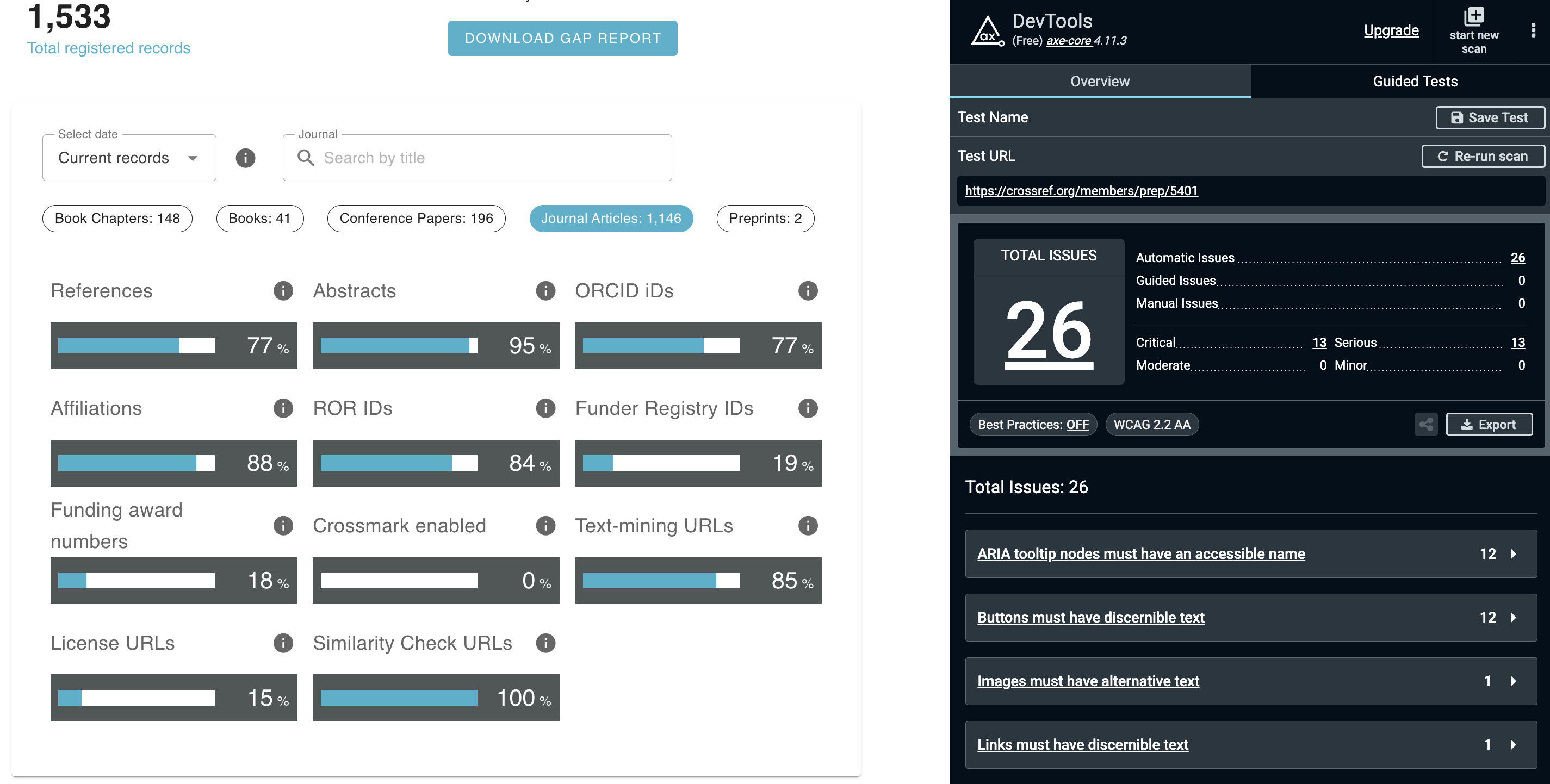
It’s also not all doom and gloom: more recently created user interfaces, such our new Metadata Manager, performed much better in the audit than legacy alternatives such as the web deposit form. We found a similar trend when looking at our report interfaces. To illustrate this, compare what happens when running the axe DevTools extension for Google Chrome on a member’s participation report - this is a user interface that was completely re-implemented in 2025. Doing this brings up 26 issues:
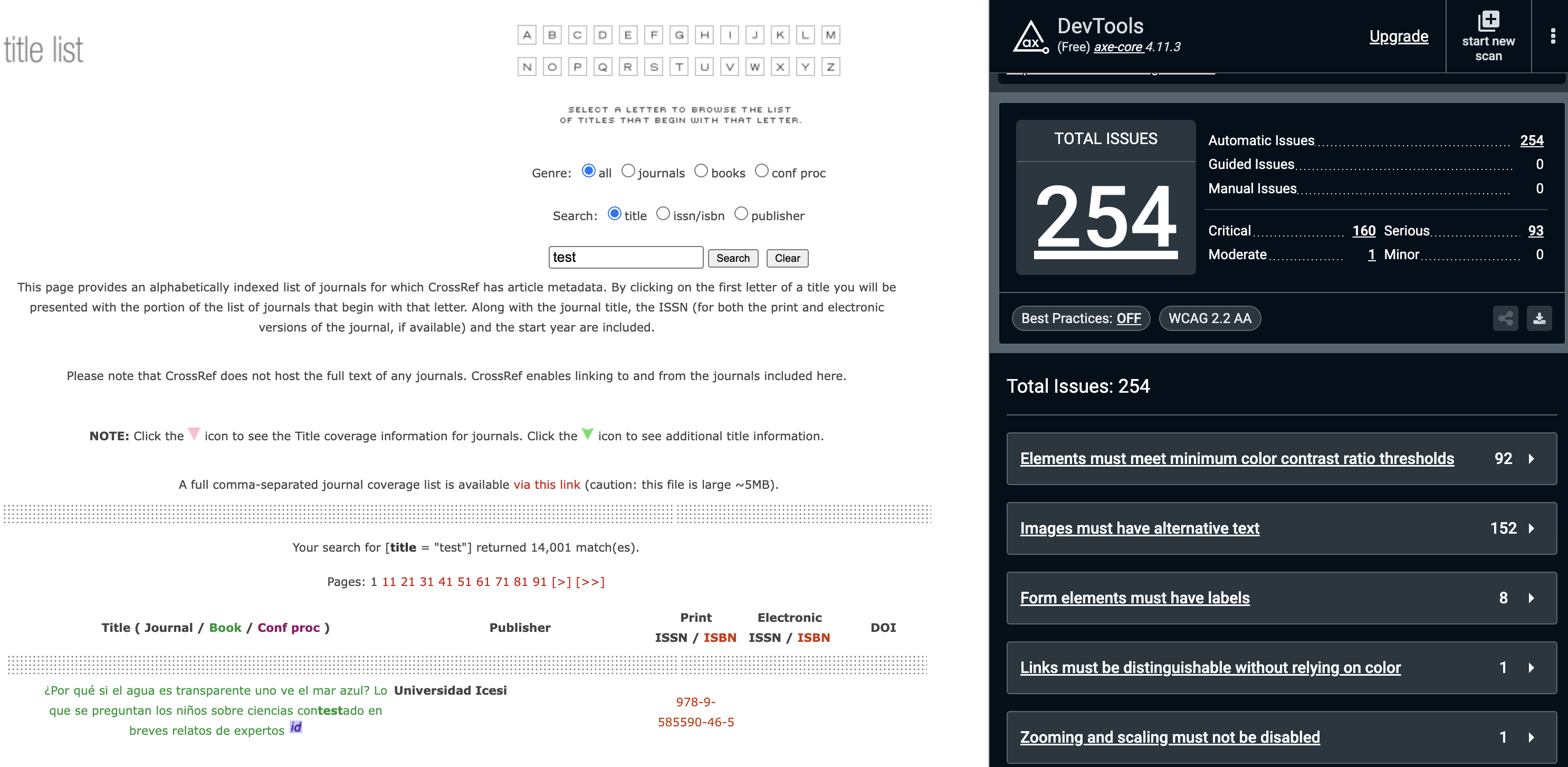
Meanwhile, the browsable title list, which has completed a few more trips around the sun, has 254 issues listed:
Beyond WCAG
If you’ve read this far, I hope you are convinced that accessibility is more than just ticking boxes on a conformance report. But especially for a global community like ours, there are other, less technical barriers to participation that we have to consider. For example, language is a major accessibility factor: much of what we as Crossref staff write and say is in English. When we host community events, we enable captions, and we try to leave space for these captions at the bottom of our slides.
We have also started experimenting with simultaneous interpretation during our online events, such as our recent project showcase event for the 2026 metadata sprint in São Paulo. You can find recordings of this event in Spanish, Portuguese, and English on our YouTube channel to see the promising results of these efforts.
What we are working on next
We are currently addressing the accessibility issues identified in our audit of the Crossmark service. Many Crossref members have implemented the Crossmark button and pop-up on their own platforms and websites, so we thought this was a great place to start the remediation efforts following our audit.
We are also in the process of redesigning our main website, www.crossref.org, following an information architecture review completed in 2025. Making changes to the design and navigation of our website will be the perfect opportunity to make our content not just more discoverable and more understandable, but also more accessible.
Clearly there is even more to be done, so watch this space for more updates on our accessibility roadmap and improvements. And if you have first-hand experience of using Crossref services and interfaces with assistive technologies, or you have other input or feedback you’d like to share, leave a comment below or start a discussion in our community forum.
References
- Vale, P. (2025). Enhancing DOI Accessibility for All Users. Crossref. https://doi-org.turing.library.northwestern.edu/10.64000/pp4rw-mtv44
- World Wide Web Consortium (2024). Web Content Accessibility Guidelines (WCAG) 2.2. Retrieved May 8, 2026, from https://www.w3.org/TR/WCAG22/
- Montilla, L. & Mahomed, R. (2026). Voices from Crossref Metadata Sprint in São Paulo. Crossref. https://doi-org.turing.library.northwestern.edu/10.64000/a5qzf-k1738
- Stoll, L. & Korzec, K. (2025). Request for proposals: Crossref website information architecture review. Crossref. https://doi-org.turing.library.northwestern.edu/10.64000/058mr-k3s56